

Contact segments
Use segments to organize and filter your contacts into specific groups
Updated August 1, 2026
Segments are especially useful when you need to work with a specific group of contacts. Instead of manually filtering every time, you can save those filters as a segment and access them instantly.
What is a segment?#
A segment is a saved list of filters. Think of it as a smart group that automatically includes contacts who match your criteria.
For example, if you create a segment with the rule "Tag must contain Active Client," the segment will always show you contacts with that tag - no manual sorting needed.
How segments work#
When you view a segment, the system only displays contacts that match all of your filter rules.

You can view any segment by clicking the filter option (spot 2 in the image above), then selecting the segment you want to see.
Creating a segment#
Click the "Add segment" button to get started.
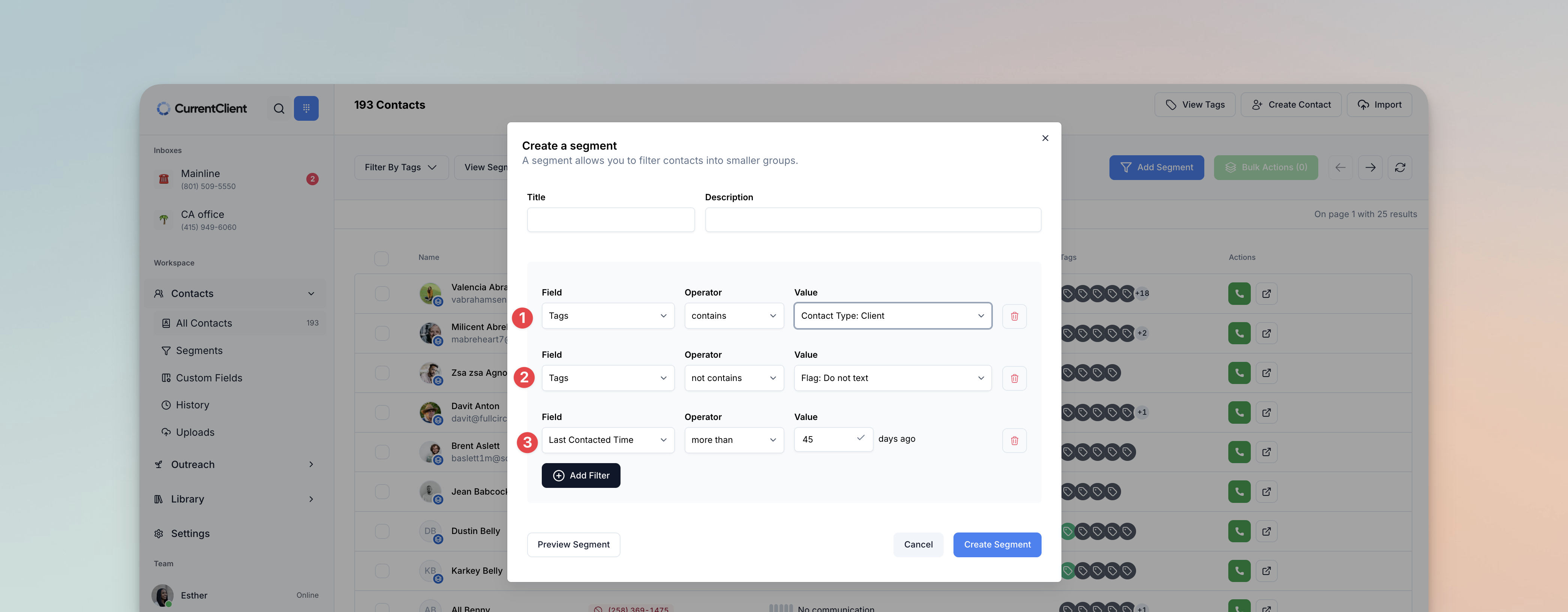
Then build your filter rules based on what you need.
Understanding the AND logic#
Important: When you create multiple rules, all of them must be true for a contact to match. Think of each rule with an "AND" between them.
For example, if you have these 3 rules:
- Tag contains Contact Type: Client
- Tag does not contain Flag: Do Not Text
- Last contacted more than 45 days ago
The contact must match all three: The contact must have a tag containing "Contact Type: Client" AND not have "Flag: Do Not Text" AND have been last contacted more than 45 days ago.
This gives you precise control over exactly which contacts appear in your segment.